Most safety toolbox talk PDFs fail—not because the content is poor, but because the format kills engagement. Workers skim, supervisors rush through them, and critical safety messages get lost in cluttered layouts or generic text. A well-structured PDF safety toolbox talk isn’t just a document—it’s a communication tool designed to inform, reinforce, and document safety behavior on site.
The right format turns a routine safety check into a meaningful conversation. This guide breaks down the optimal structure, common mistakes, and real-world applications of a high-impact PDF safety toolbox talk.
Why Most PDF Safety Toolbox Talks Get Ignored
Safety teams distribute PDF toolbox talks assuming readability equals effectiveness. But a poorly formatted document—even if technically compliant—won’t change behavior.
Common flaws include: - Overly dense paragraphs with no visual hierarchy - Missing space for signatures or attendance logs - No clear action items or takeaways - Generic content that doesn’t reflect site-specific hazards - Lack of mobile-friendly formatting for on-the-go access
A PDF isn’t just a file—it’s the delivery mechanism for safety culture. If it’s hard to read on a phone in bright sunlight or takes five minutes to scroll through, it won’t be used.
Core Elements of an Effective PDF Toolbox Talk Format
An effective PDF safety toolbox talk balances clarity, compliance, and usability. It must be easy to read, quick to deliver, and legally defensible if needed. Here are the non-negotiable components:
1. Header with Key Metadata Every talk should start with structured header information: - Date of meeting - Job site or location - Topic title (e.g., "Fall Protection Awareness") - Supervisor name - Duration of talk - Weather and shift info (optional but helpful)
This metadata ensures traceability and helps during audits.
2. Objective Statement (One Sentence) A clear, plain-language goal sets the tone. Example: “Today’s talk will review proper harness inspection and anchorage points for work at height.”
Avoid vague phrasing like “discuss safety.” Be specific about what will be covered and why it matters today.
3. Hazard Breakdown with Visual Cues List 2–4 specific hazards related to the topic. Use bullet points and icons (in editable templates) to improve scanability.
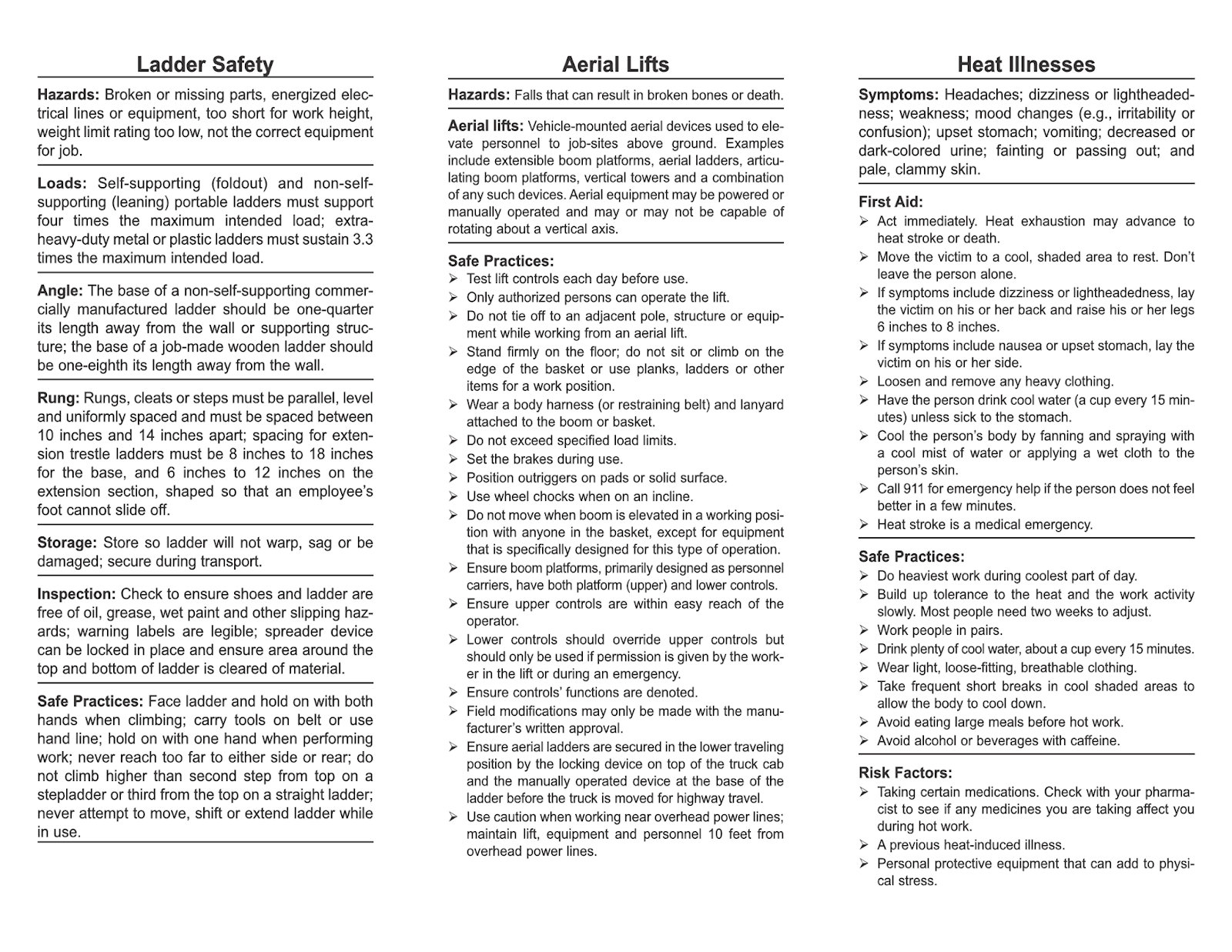
For a ladder safety talk: - Using damaged or unstable ladders - Incorrect angle setup (4:1 rule not followed) - Carrying tools while climbing - Overreaching from side rails
Pair each hazard with a real-world consequence: “Overreaching can shift your center of gravity—leading to backward falls, even from low heights.”
4. Prevention & Best Practices Turn hazards into actions. Each risk should map to a clear mitigation step.
| Hazard | Prevention |
|---|---|
| Damaged ladder | Inspect rungs and rails before use; tag and remove if cracked |
| Incorrect angle | Maintain 75° angle—use the ‘one-in-four’ rule (1 ft out for every 4 ft up) |
Tables like this improve retention and provide quick reference during field work.
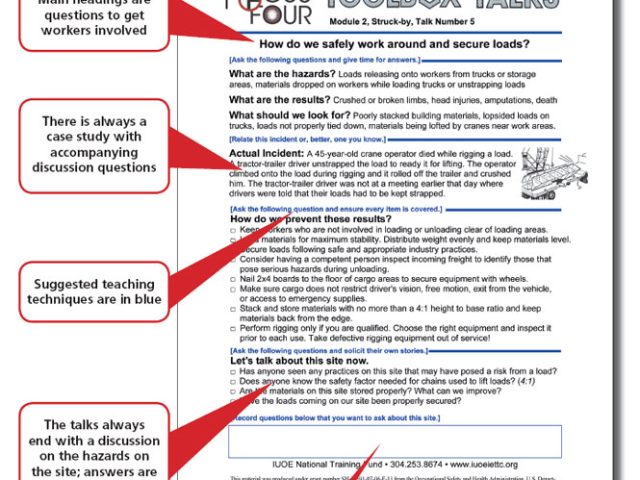
5. Discussion Prompts A toolbox talk isn’t a lecture. Include 2–3 open-ended questions to spark engagement: - “Has anyone seen a near-miss with ladder use this week?” - “What’s one thing we can do differently to prevent falls during material handling?”
Leaving space for handwritten responses encourages participation and creates a record of dialogue.
6. Attendance & Signature Section
This section is critical for compliance. Include: - Employee name - Signature (wet or digital) - Date - Job title or role
Use a clean table format with enough space for signatures—even on mobile devices.
Real-World Use Cases: How Format Impacts Outcomes
Case 1: Electrical Safety on a Commercial Renovation A general contractor used a PDF toolbox talk focused on lockout/tagout (LOTO) procedures before starting HVAC upgrades. The format included: - A diagram of a properly locked breaker panel - Step-by-step LOTO checklist - Space for workers to list energy sources they’d isolate that day
Result: Zero electrical incidents during the project phase, and OSHA auditor cited the documentation as “clear and actionable.”
Case 2: Slip, Trip, and Fall Prevention in Winter A northern construction crew distributed a winter-specific PDF with: - Photos of icy walkways vs. properly treated paths - A reminder to wear slip-resistant boots - A checklist: “Before you start, inspect your path for snow buildup, loose cords, or debris”
Field supervisors reported higher compliance with housekeeping rules after using the visual format.
Case 3: Failed Format — The Wall-of-Text PDF One subcontractor used a 3-page, single-paragraph PDF on PPE. No headers, no visuals, no space for signatures. Workers signed without reading. During an incident investigation, the document was deemed “not demonstrative of active training.”
Lesson: Format affects legal defensibility. A disorganized PDF undermines its own purpose.
5 Tools to Create and Distribute PDF Safety Toolbox Talks
You don’t need to design from scratch. These platforms help create professional, reusable PDF formats:
| Tool | Best For | Format Flexibility | Mobile Access |
|---|---|---|---|
| SafetyCulture (iAuditor) | Teams needing digital workflows | High – custom templates, PDF export | Yes, with offline use |
| SiteDocs | Heavy industrial sites | Full PDF customization + e-signatures | Yes, iOS/Android |
| Intelex (by UL) | Enterprise compliance | Robust PDF generation with audit trails | Cloud-based access |
| GoCanvas | Small to mid-sized crews | Drag-and-drop PDF builder | Mobile app with camera capture |
| Adobe Express + Acrobat | In-house design control | Maximum layout control | PDFs viewable anywhere |
Each supports export to PDF, but the key differentiator is how they handle real-time use. Tools like SafetyCulture let you complete and sign talks on-site, then auto-generate compliant PDFs—reducing paperwork lag.
Design Tips for Readable, Actionable PDFs
A good PDF toolbox talk is designed for real conditions: - Use 11–12pt sans-serif fonts (like Arial or Calibri) for outdoor screen readability - Limit to 2 pages max—one for content, one for sign-in - Use color sparingly—highlight warnings in yellow, actions in blue - Add QR codes linking to video demos or extended guides - Optimize for mobile—test how it looks on a phone screen
One safety manager reported a 40% increase in engagement after switching from 3-page PDFs to a two-column, single-page format with icons and whitespace.
Common Mistakes That Undermine Compliance
Even with the right template, execution gaps can invalidate your efforts.
Mistake 1: Copy-Paste Topics Without Customization
Using the same “fire safety” talk across all sites ignores context. A warehouse talk should address flammable storage; an office talk focuses on evacuation routes.
Fix: Add a “Site-Specific Notes” box to every PDF.
Mistake 2: Skipping the Discussion Signing a PDF doesn’t mean the talk happened. Some crews circulate sign-in sheets without a meeting.
Fix: Include a supervisor attestation: “I confirm this toolbox talk was delivered verbally on [date] at [time].”
Mistake 3: Failing to Archive Properly PDFs saved haphazardly on personal drives won’t survive an audit.
Fix: Use a centralized folder system: /Safety/TBT/[Year]/[Month]/[Date]_[Topic].pdf
Or better—use a cloud platform with version control.
How to Turn a PDF Into a Behavior-Change Tool
The best PDFs don’t just record—they drive action.
- Try this workflow:
- Deliver the talk using the PDF as a guide
- Collect signatures and discussion notes
- Post a summary on the site bulletin board (e.g., “Top 3 ladder risks this week”)
- Follow up with a spot check: observe workers using ladders, give feedback
- Archive the PDF with photos from the follow-up
This closes the loop between communication and accountability.
One electrical contractor reduced repeat violations by 60% after adding photo documentation to their PDF process—showing both correct and incorrect practices.
Final Format Checklist Before Distribution
Before you print or send, verify your PDF includes: - [ ] Clear topic and objective - [ ] 2–4 site-relevant hazards - [ ] Actionable prevention steps - [ ] 2+ discussion questions - [ ] Attendance/signature table - [ ] Supervisor attestation - [ ] Date, location, and job-specific details - [ ] Mobile-friendly layout (test on phone)
A checklist like this prevents last-minute oversights that compromise safety and compliance.
A PDF safety toolbox talk shouldn’t be a box-ticking exercise. When built with intent—structured for clarity, engagement, and accountability—it becomes a cornerstone of proactive safety culture. Use the right format, avoid common pitfalls, and treat every talk as a chance to reinforce safe behavior, not just collect signatures.
Start with a proven template, refine it for your site, and distribute consistently. That’s how PDFs move from paperwork to protection.
What should a PDF safety toolbox talk include? A complete PDF should have a topic, hazards, prevention steps, discussion prompts, attendance log, and supervisor attestation.
Can I use the same PDF for multiple job sites? Only if you customize the site-specific details. Generic talks lack relevance and reduce engagement.
How long should a safety toolbox talk PDF be? Ideally one to two pages. Focus on clarity and usability, not volume.
Are digital signatures valid on PDF toolbox talks? Yes, if your system complies with electronic record laws (e.g., OSHA accepts digital logs if authentic and accessible).
Should toolbox talk PDFs include images? Yes—diagrams, photos, or icons improve comprehension, especially for non-native speakers or visual learners.
How often should I update my PDF templates? Review every 6–12 months, or after an incident, near-miss, or change in regulations.
Can OSHA cite me for a poorly formatted PDF? OSHA doesn’t mandate PDF style, but they can cite if the content shows lack of training, missing signatures, or no evidence of delivery.
FAQ
What should you look for in PDF Safety Toolbox Talk Format That Teams Actually Use? Focus on relevance, practical value, and how well the solution matches real user intent.
Is PDF Safety Toolbox Talk Format That Teams Actually Use suitable for beginners? That depends on the workflow, but a clear step-by-step approach usually makes it easier to start.
How do you compare options around PDF Safety Toolbox Talk Format That Teams Actually Use? Compare features, trust signals, limitations, pricing, and ease of implementation.
What mistakes should you avoid? Avoid generic choices, weak validation, and decisions based only on marketing claims.
What is the next best step? Shortlist the most relevant options, validate them quickly, and refine from real-world results.